Author Topic: posting issues.  (Read 110 times)

poisoninthestain

  • Dominant Queen
  • ****
  • Posts: 298
posting issues.
« on: September 07, 2009, 06:21:03 PM »
Whenever I type to post in a thread eventually the text starts scrolling back in forth and makes it almost impossible to finish typing. I don't know if it's the settings on my PC or what.

I wish I could be more descript but that's the best way I can describe it.

 >:(

Vesp

  • Administrator
  • Foundress Queen
  • *****
  • Posts: 3,130
Re: posting issues.
« Reply #1 on: September 07, 2009, 06:40:52 PM »
I don't think that is the forums doing, I'd be interested in hearing more about it though, screen shots?
Bitcoin address: 1FVrHdXJBr6Z9uhtiQKy4g7c7yHtGKjyLy

poisoninthestain

  • Dominant Queen
  • ****
  • Posts: 298
Re: posting issues.
« Reply #2 on: September 12, 2009, 06:41:57 PM »
I think taking a screenshot would be tough since it only happens when I type and only for a brief instant.

I tried it on three different computers through three different IP's, modems.

Still the same.

Only happens when I reach the bottom of the screen.

German

  • Subordinate Wasp
  • ***
  • Posts: 228
Re: posting issues.
« Reply #3 on: September 12, 2009, 07:39:29 PM »
Yeah not the forum, must be your browser/firewall/system/whatever. Don't you just love Bill Gates.

Sedit

  • Global Moderator
  • Foundress Queen
  • *****
  • Posts: 2,099
Re: posting issues.
« Reply #4 on: September 12, 2009, 07:41:36 PM »
Sounds like your mouse is stuck, perhaps the little wheel in the middle since I had the same problem a while back.
There once were some bees and you took all there stuff!
You pissed off the wasp now enough is enough!!!

WazOne

  • Larvae
  • *
  • Posts: 29
Re: posting issues.
« Reply #5 on: September 12, 2009, 09:25:25 PM »
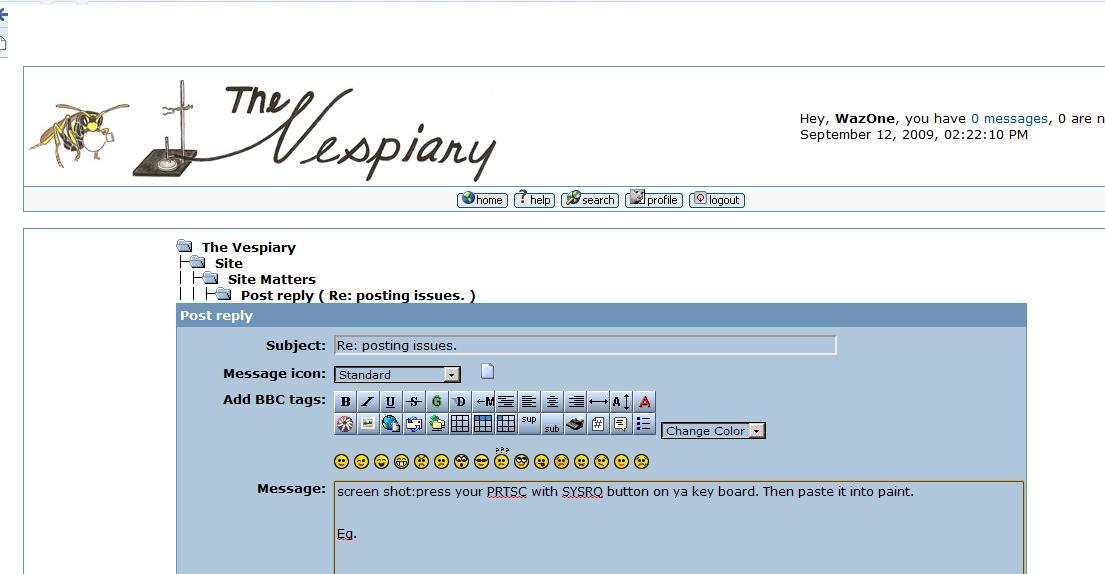
screen shot:press your PRTSC with SYSRQ button on ya key board. Then paste it into paint.


Eg.
« Last Edit: September 13, 2009, 04:27:30 AM by WazOne »

Vesp

  • Administrator
  • Foundress Queen
  • *****
  • Posts: 3,130
Re: posting issues.
« Reply #6 on: September 13, 2009, 07:02:11 PM »
I see, well if you have tried it on different computers... maybe the forum is to blame.. however no one else has had this problem have they?

The settings you have on all of them must be causing it..
I don't know what to tell you other then to look more into it..
Does it happen on firefox?
Bitcoin address: 1FVrHdXJBr6Z9uhtiQKy4g7c7yHtGKjyLy

heisenberg

  • Dominant Queen
  • ****
  • Posts: 268
Re: posting issues.
« Reply #7 on: September 13, 2009, 07:04:06 PM »
Scrolling issues can sometimes be caused by blank unicode characters.
I spent all my money on booze and hookers, the rest I wasted - Charles Bukowski

poisoninthestain

  • Dominant Queen
  • ****
  • Posts: 298
Re: posting issues.
« Reply #8 on: September 19, 2009, 06:51:49 PM »
I fixed it. Sedit was right. It was the mouse...all of them. They were all PIECES OF SHIT!  :)


Sedit

  • Global Moderator
  • Foundress Queen
  • *****
  • Posts: 2,099
Re: posting issues.
« Reply #9 on: September 24, 2009, 11:57:19 PM »
I just had the same thing happen yesterday matter of fact poison. I let it go so I could systematicly figure out what was going on for you. It turns out this time it was a stuck space bar causing it to happen. Just a side note thought I would let you know.
There once were some bees and you took all there stuff!
You pissed off the wasp now enough is enough!!!

hypnos

  • Dominant Queen
  • ****
  • Posts: 402
Re: posting issues.
« Reply #10 on: October 23, 2009, 01:17:27 AM »
hey guys a lot of time  i am online using public computers and so i use the auto logout function just in case i forget to.......but...........

it would be really good to get a "reminder" the session is about to end..say a 5min warning....

i just put together a big post...and couldnt post it coz i got logged out-- and i lost my jumbo post into cyberspace!!! shit shitty shit

can you reform this possibly ;D

"the two things you can give away and never lose, are what you know, and how you feel...."

Vesp

  • Administrator
  • Foundress Queen
  • *****
  • Posts: 3,130
Re: posting issues.
« Reply #11 on: October 23, 2009, 04:34:41 AM »
Yes I will work on that but in the mean time you can always press the back button, copy it, and log back in, and then paste it.
Sorry for this inconvenience, and I will be trying to fix it soon!
Bitcoin address: 1FVrHdXJBr6Z9uhtiQKy4g7c7yHtGKjyLy

Vesp

  • Administrator
  • Foundress Queen
  • *****
  • Posts: 3,130
Re: posting issues.
« Reply #12 on: October 23, 2009, 04:41:36 AM »
Though I am not totally sure, I believe I have significantly extended the time before it kicks you off.
Please let me know if it happens again or if their are any additional problems....
Bitcoin address: 1FVrHdXJBr6Z9uhtiQKy4g7c7yHtGKjyLy

ChesireCat

  • Larvae
  • *
  • Posts: 30
Re: posting issues.
« Reply #13 on: November 15, 2009, 08:15:42 AM »
Ive already tackled this one elsewhere. The problem exists within internet exploader 8.. There is a workaround that I have employed and it seems to be working well. Alternatively you can simply have the folks that use IE8  set the browser for compatibility mode for this site. It's probably a better idea to omit the workaround here, as the member base is small enough that anyone experiencing the problem is bound to speak up about it.

Below is the latest workaround (different than what I have applied) the source of which comes from http://dev.simplemachines.org/mantis/view.php?id=3354&nbn=20

CC

regularexpression (Viewer)
2009-06-06 20:36
edited on: 2009-06-06 21:20

 http://www.microsoft.com/communities/newsgroups/list/en-us/default.aspx?dg=microsoft.public.internetexplorer.beta&tid=b95398ac-e5cc-4642-9c9f-d85d08deeac6&cat=en_us_2BAF8EC5-645C-4477-A380-0F1CF6C102F9&lang=&cr=&sloc=&p=1 [^]

In the month since my last post, this IE8 bug has turned up all over the net.
The only solution I could find on the net is to NOT set a percentage(%) width for the editor (until Ms fix the bug)

Sources/Subs-Editor.php
FIND
        'width' => isset($editorOptions['width']) ? $editorOptions['width'] : '70%',
REPLACE
        // IE8 Bug - % width causes scrollbar jumping around, so use a px width.
        'width' => isset($editorOptions['width']) ? $editorOptions['width'] : ($context['browser']['is_ie8'] ?'700px' : '70%'),

However setting a fixed width might be good for all resolutions.
I did a bit of testing and discovered that that we can abuse min-height/max-height instead.
1. Set fixed width (to anything), [i used 700px just in case]
2. Set min-width afterwards to the percentage width eg 70%
3. Set max-width afterwards to the percentage width eg 70%
WHAHALA!. No more jumping around.

Themes/default/GenericControls.template.php (and similarly for Curve)
FIND
                            <textarea class="editor" name="', $editor_id, '" id="', $editor_id, '" rows="', $editor_context['rows'], '" cols="', $editor_context['columns'], '" onselect="storeCaret(this);" onclick="storeCaret(this);" onkeyup="storeCaret(this);" onchange="storeCaret(this);" tabindex="', $context['tabindex']++, '" style="width: ', $editor_context['width'], '; height: ', $editor_context['height'], ';', isset($context['post_error']['no_message']) || isset($context['post_error']['long_message']) ? 'border: 1px solid red;' : '', '">', $editor_context['value'], '</textarea>

REPLACE
                            <textarea class="editor" name="', $editor_id, '" id="', $editor_id, '" rows="', $editor_context['rows'], '" cols="', $editor_context['columns'], '" onselect="storeCaret(this);" onclick="storeCaret(this);" onkeyup="storeCaret(this);" onchange="storeCaret(this);" tabindex="', $context['tabindex']++, '" style="', ($context['browser']['is_ie8'] ? 'width: 700px; max-width: ' . $editor_context['width'] . '; min-width:' . $editor_context['width'] : 'width: ' . $editor_context['width']) , '; height: ', $editor_context['height'], ';', isset($context['post_error']['no_message']) || isset($context['post_error']['long_message']) ? 'border: 1px solid red;' : '', '">', $editor_context['value'], '</textarea>